Short answer: Open Business Hub in the ChatGPT sidebar, search for your business, then prove you own it by phone, business email, Shopify, or a website domain check. For the domain check, you add one TXT record to your domain’s DNS, wait for it to appear, and click Verify domain. After OpenAI approves the claim, a second check with Persona (identity verification) unlocks editing, insights and the verified badge.
We just did this for belucid.agency. Here is the exact process, with our screenshots, and the small mistakes that make verification fail.
Why this matters now
More customers ask ChatGPT before they ask Google. “Best Ayurveda resort in Kovalam.” “A digital marketing agency in Kochi that does SEO.” ChatGPT answers with a few names.
Business Hub is OpenAI’s new way for owners to manage what ChatGPT knows about their business: your website, description, category, logo and policies. It also shows you how often ChatGPT mentions you and how many people click through to your site.
One thing to be clear about from the start. Claiming your business does not guarantee that ChatGPT will recommend you more often, and advertising does not influence ChatGPT’s own answers (OpenAI Help Center). What claiming does is make sure the information ChatGPT has about you is correct and yours to update.
Before you start
You need:
- A ChatGPT account. A free account works; you don’t need ChatGPT Enterprise or an Ads account.
- Authority to represent the business. You must own it or be authorised by the owner.
- Access to one of these: the business phone number, the business email address, the website’s DNS settings, or the Shopify store.
- For the later identity step: a government ID, business registration details, and proof you can represent the business.
Who is eligible: availability depends on where the business is and what kind it is. Online businesses may see an option to add a new listing. Local stores and restaurants can currently only claim an existing listing in the US (OpenAI). If you’re in Kerala or the Gulf, open Business Hub and check what it offers for your business today; the options are expanding.
Step 1: Open Business Hub and find your business
- Sign in to ChatGPT.
- Open Business Hub from the sidebar.
- Search for your business by name.
- Select the listing that matches your business, and confirm the ChatGPT account you’ll use to manage it.
If your business isn’t listed and you run an eligible online business, you may see an option to add it instead.
If you see Contact support, the listing is locked. Use that button to request access.
Step 2: Choose how to verify
ChatGPT offers one or more of these methods:
| Method | What happens | Best when |
|---|---|---|
| Business phone | A code by SMS or automated call | The public business number is yours |
| Business email | A code sent to the email linked to the business | You use an email on your own domain |
| Website domain | You add a TXT record to your DNS | You control the website’s domain |
| Shopify store | You connect and log in to Shopify | You sell through Shopify |
We used Website domain. It’s the most reliable proof for an agency or online business, and it’s the one people get stuck on, so the rest of this guide covers it in detail.
Step 3: Copy the TXT record ChatGPT gives you
When you choose Website domain, ChatGPT shows three things: a Type, a Name or host, and a Value or content.
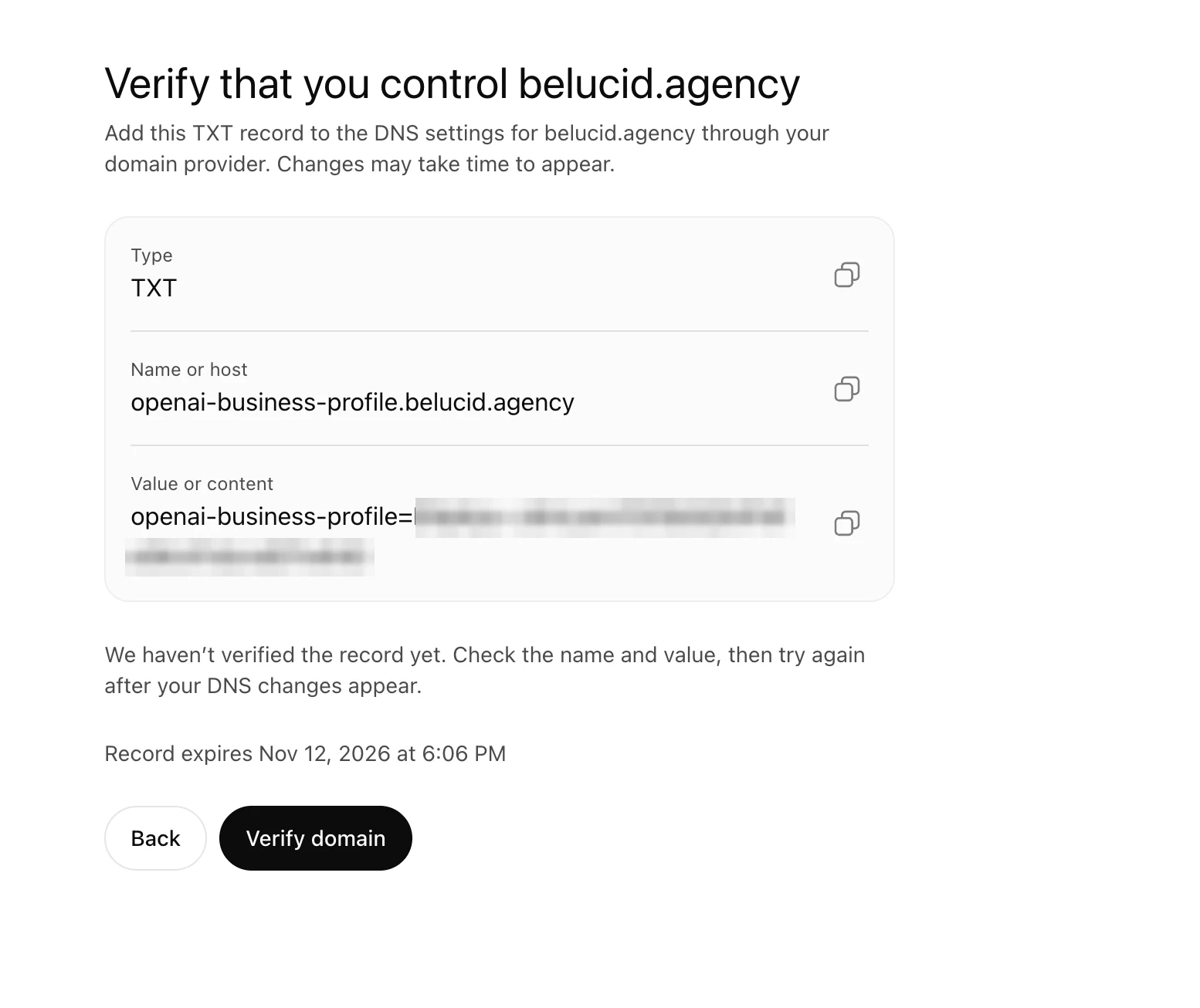
Three things to note on this screen:
- Type is always TXT.
- Name or host looks like
openai-business-profile.yourdomain.com. - The record expires. Ours showed an exact expiry time. Add the record straight away and verify within that window. If it expires, ChatGPT gives you a new value.
Use the copy buttons. The value is a long random code with letters that look alike: a capital I, a small l and the number 1 are almost identical in many fonts. One wrong character and verification fails. Don’t retype it from a screenshot.
Step 4: Add the record in your DNS
Your DNS is managed wherever your domain’s nameservers point. That’s usually your domain registrar or your hosting company (Hostinger, GoDaddy, Cloudflare, Namecheap and so on). Our domain uses Hostinger, so here is the Hostinger route:
- Log in to hPanel.
- Go to Websites → your site → Advanced → DNS Zone Editor. If your domain is registered elsewhere but uses Hostinger’s nameservers, it’s also under Domains → Manage DNS.
- Under Manage DNS records, set:
- Type: TXT
- Name: only the first part,
openai-business-profile. Hostinger adds.yourdomain.comitself. - TXT value: paste the full value from ChatGPT, including the part before the
=sign. - TTL: leave the default.
- Click Add Record.

The most common mistake: a doubled domain name
ChatGPT shows the full host, openai-business-profile.yourdomain.com. Most DNS panels add your domain automatically. If you paste the full host into the Name field, the record ends up at openai-business-profile.yourdomain.com.yourdomain.com, and verification fails.
Enter only openai-business-profile in the Name field. If your DNS panel shows .yourdomain.com greyed out next to the box, as Hostinger does, that’s your sign it will be added for you.
Step 5: Check the record is live, then click Verify domain
Before clicking Verify, check that the record can actually be seen. Two free ways:
- Google Admin Toolbox Dig: go to
toolbox.googleapps.com/apps/dig, choose TXT, and enteropenai-business-profile.yourdomain.com. - Terminal (Mac or Linux): run
dig +short TXT openai-business-profile.yourdomain.com
When it returns your exact value, go back to ChatGPT and click Verify domain.
“We haven’t verified the record yet”: why it can fail even when the record is right
This happened to us. Our record was live: Hostinger, Google, Cloudflare and other public DNS services all returned the exact value. ChatGPT still said:
“We haven’t verified the record yet.”
The usual reason is caching. If you clicked Verify before adding the record, the DNS system remembers “no record here” for a short time. For our domain that’s up to 10 minutes; your DNS settings may differ. During that time a new check can still see the old “no record” answer.
What to do:
- Wait 10 minutes after adding the record, then click Verify domain again.
- Stay on the same screen. If you go Back and start again, ChatGPT may issue a new value, and the old record won’t match.
- Changing the TTL won’t speed this up. TTL controls how long a record is remembered after it has been seen, not how quickly it’s first found.
- If the record expires before verification succeeds, start again, get the new value, and replace the old one in your DNS.
For us, waiting was all it took: belucid.agency verified on the next attempt, with the same record and no other changes.
Step 6: Claim approval and identity verification
Verifying the domain proves control of the website. It doesn’t finish the process.
- Claim review. OpenAI reviews your claim and emails you a decision, or asks for more information.
- Identity verification with Persona. To publish changes, see insights, or create a business agent, complete Verify with Persona. Have a government ID and business registration details ready. Make sure the business name, address and any registration or tax number match your official records exactly.
- Verified badge. The blue check appears only after Persona verification is approved. Claiming alone doesn’t give you the badge.
You can keep the TXT record in your DNS afterwards. It does no harm.
Step 7: Complete your profile
Once both approvals are through, open your business in Business Hub and fill in everything:
- Website
- Business description
- Product or service category
- Logo and cover photo
- Delivery and return policies, if you sell products
OpenAI reviews changes before publishing them, so updates take time to appear. ChatGPT may also use other sources when it answers questions about your business.
If you sell products, you can connect a product feed (a CSV or Shopify feed) to share prices and availability.
Business agents, a chat assistant that answers customer questions about your products and policies, are currently available to eligible ecommerce and online service businesses in the US.
What you can measure
Business Hub Insights show the last 28 days:
- Mentions: for an online business, when ChatGPT references your website. Your brand name alone doesn’t count.
- Website clicks: people who clicked through to your site.
- Discovery topics: common themes in answers that mentioned you. These aren’t individual customer questions.
A blank number doesn’t always mean zero. Data may still be collecting, or activity may be below the reporting threshold.
Claiming is step one. Being chosen is the real work.
Claiming your business makes your information correct. It doesn’t make ChatGPT pick you over the resort, restaurant or agency down the road. What helps ChatGPT recommend a business is the same thing that helps a customer choose one:
- Pages that explain each service in plain words. One clear page per service, with the questions customers actually ask.
- Consistent details everywhere. The same name, address, phone number and hours on your website, Google Business Profile, ChatGPT profile and directories. Our Google Business Profile checklist covers the Google side.
- Reviews that describe real problems. “They sorted our group booking in ten minutes” helps more than “Great service!”
- A site that AI can read. Plain text that loads without heavy scripts, a sitemap, and clear headings. See what makes a website AI-ready.
AI doesn’t know which business is best. It knows which business explained itself most clearly. That is the work we do in SEO & AI search.
FAQ
Is it free to add my business to ChatGPT?
Yes. Claiming a business in Business Hub doesn’t require an Ads account or a paid ChatGPT plan.
How long does domain verification take?
The DNS record usually appears within minutes. If you checked before adding it, wait about 10 minutes for the cached “no record” answer to clear. Claim review and Persona verification can take longer, and OpenAI emails you the result.
What do I enter in the Name field?
Usually only openai-business-profile, without your domain. Most DNS panels add the domain automatically.
Will claiming my business get me recommended more in ChatGPT?
Not directly. It lets you manage your information and see insights. OpenAI says it doesn’t guarantee more visibility, and ads don’t influence ChatGPT’s independent answers.
Can my agency manage our ChatGPT business profile?
Yes. The admin who claimed the business can add teammates and grant an agency access in Business Hub. Each person uses their own ChatGPT account.
My business is in Kerala. Can I claim it?
Availability depends on your business’s location and type. Open Business Hub, search for your business, and see which options it shows you. Online businesses may be able to add a new listing.
Want help getting found on ChatGPT, Google and Maps?
We help Kerala and Gulf businesses get found and chosen across Google, Maps and AI assistants.
- Free live session (in Malayalam): Get Found Online, Friday 15 January 2027, 7:00 pm IST. Save your seat
- Discoverability audit: we check how your business appears on Google, Maps and ChatGPT, and what to fix first. Request an audit
Related: Why your business is not showing up in ChatGPT and how ChatGPT chooses which businesses to recommend.
Source: Setting up your business on ChatGPT, OpenAI Help Center, checked 12 Nov 2026. Business Hub is new and may change; we’ll update this guide when it does.